ConnecTo
2022/12/13 - Github API
codevil
2022. 12. 14. 21:40
이번 프로젝트에서 Github Api를 사용하기 위하여 octokit이라는 라이브러리를 사용하였다. octokit 설정은 개인 계정과 단체 계정은 설정을 하는 방법이 다르다. 이걸 모르고 공식문서에서 그대로 access key를 사용하고 시간을 엄청사용했다.흑..
octokit의 사용방법은
- api key 발급
- 사용
두 가지 단계로 나뉜다. 개인의 방법은 인터넷에 많기에 안쓸까 했었지만, 혹시나 개인 계정에도 나중에 사용할 수 있으니 두가지 나열하겠다.
1. 개인 계정
api key 발급
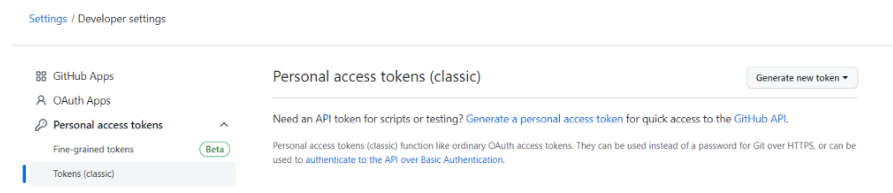
- Settings > Developer settings로 이동한다
- Personal access tokens 발급
octokit 사용방법
import { Octokit } from '@octokit/rest';

const octokit = new Octokit({
	auth: "secret123"
});

const sendIssue = async (title?: string, detail?: string) => {
    try { await octokit.rest.issues.create({
	          title: title,
	          body: detail
        });
    } catch (error) {
      console.log(error);
    }
  };
Octokit을 생성하고 auth를 받아서 사용하면 된다.
2. 단체 계정
api key 발급
- Your Organizations>Settings > Developer settings > Github Apps로 이동한다
- Private Key를 발급하고 App id, Client id를 메모한다
octokit 사용방법
import { Octokit } from '@octokit/rest';
import { createAppAuth } from '@octokit/auth-app';

const octokit = new Octokit({
  authStrategy: createAppAuth,
  auth: {
    appId: process.env.REACT_APP_APP_ID,
    privateKey: process.env.REACT_APP_PRIVATE_KEY,
    clientId: process.env.REACT_APP_CLIENT_ID,
    clientSecret: process.env.REACT_APP_CLIENT_SECRET,
    installationId: process.env.REACT_APP_INSTALLATION_ID,
  },
});

const sendIssue = async (title?: string, detail?: string) => {
    try { await octokit.rest.issues.create({
	          title: title,
	          body: detail
        });
    } catch (error) {
      console.log(error);
    }
  };
개인 아이디 같은 경우에는 발급 받을게 Personal access key 한 개였지만, 단체키는, Oauth Apps, Git Apps 두 개의 항목과, Git Apps에 public key와 private key 두 개가 있다보니 이게 맞게 작동하나 3개의 키를 사용하다보니 시간이 많이든 것 같다.(auth-app와 auth를 객체로 넣는 다는 것도 너무 늦게 찾은 것도 큰 비중을 찾이했지만.)